
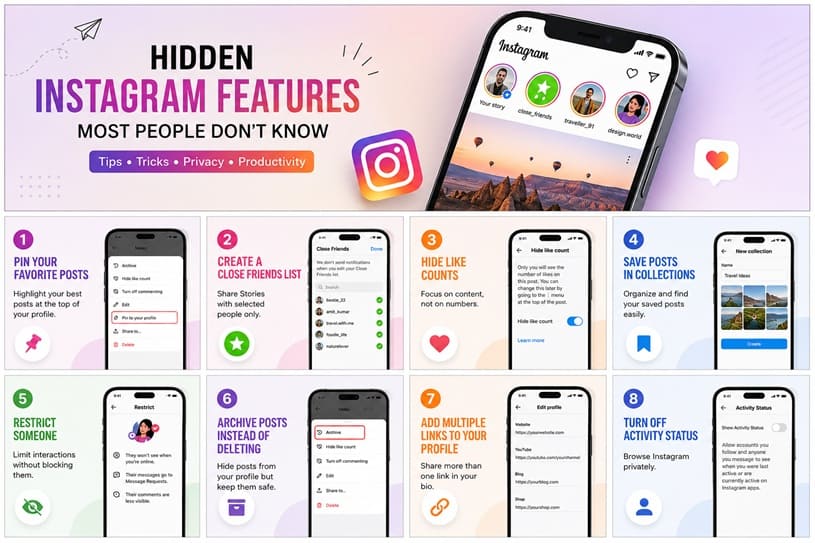
Instagram is among the most popular social media worldwide. It is used by millions of people daily to send photos, videos, Stories and Reels. Although many of the features that users are familiar with, there are several hidden tools in Instagram that can enhance the user experience.
These are features that can assist you in maintaining privacy, structuring your account, developing better content and saving time. Often these options are not seen by many people since they are concealed in the app settings.
In this guide, you will learn some of the hidden Instagram features most people are unaware of. Whether you’re a casual user, content creator, or business owner, these tips can help you get more from Instagram.
Table of Contents
Pin Your Favorite Posts
Have a post in needs more attention?
You can pin up to three posts on top of your profile with Instagram. This is a fantastic means to showcase your best content.
How to Pin a Post
- Open the Instagram account.
- Select the post.
- Tap the three dots menu.
- Choose Pin to Your Profile.
A useful feature for creators, businesses, or those who wish to have significant posts displayed first.
Read messages quietly without sending “seen”
There are times when you’ll want to read a message and reply to it.
Often times, you can skip marking a message as “Seen” right away by previewing notifications or by using message management features. Please note, Instagram can alter the read receipt functionality, so the outcomes might differ between the app version.
This adds a little more room for manoeuvre prior to responding.
Hide Like Counts
If you feel pressured by likes, you can also hide the likes on Instagram.
To Hide Likes
- Open the post.
- Tap the three dots.
- Click on Hide Like Count.
Additionally, you can opt to conceal the amount of likes received by posts from other individuals.
This will help you concentrate more on the content and not numbers.
YOU MUST CHECK: Tokyo Ravens Season 2: Shocking Update Fans Can’t Ignore In 2026!
Make a Close Friends List
Not all Stories are to be shared with everyone.
The Close Friends feature lets you create private Stories that can be viewed by only a few people.
Benefits
- More privacy
- Share personal moments
- Avoid posting publicly
Many creators also leverage this feature to be able to have special updates.
Schedule Posts Inside Instagram
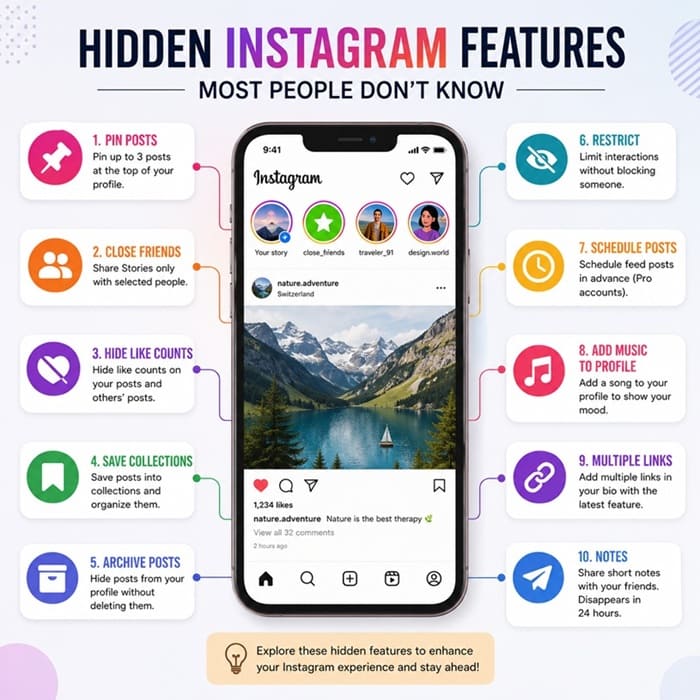
There are still a lot of people that believe that scheduling needs another app.
Business accounts have the option to program posts within Instagram.
Benefits
- Save time
- Stay consistent
- Be prepared for the content of your plans.
This is particularly beneficial for businesses and creators.
Use Hidden Story Stickers
There are numerous stickers you don’t know about for Instagram Stories.
Useful stickers:
- Poll
- Quiz
- Countdown
- Question Box
- Add Yours
- Emoji Slider
- Music
- Link Sticker
With these stickers, followers can engage with your Stories and boost engagement.
Save posts to Collections
Save posts into well-organized folders rather than taking screenshots.
Example Collections
- Travel Ideas
- Recipes
- Fashion
- Workout Plans
- Business Ideas
- Photography Inspiration
This way it is far simpler to locate saved content the next time.
Limit or restrict access to someone without blocking them out when you don’t need to.
Restrict Someone Without Blocking Them
Instagram’s Restrict is a sneaky way of restraining your interaction.
When you restrict someone:
- Their remarks get less noticeable.
- It’s difficult for them to know when you’re on the computer.
- Their messages then go to a Message Requests.
It’s a great option for handling unwanted interactions without creating conflict.
Instead of deleting posts, archive them
Not satisfied with the photo they’re using?Not satisfied with their old photo?
Don’t delete it, archive it.
Archived posts do not appear on your profile but only to you.
These can be easily recovered at any time.
Create multiple links to your profile.
Instagram has now introduced the option to have several links in your bio.
Rather than select just one website, you can connect to:
- Your website
- YouTube channel
- Blog
- Online store
- Portfolio
- Other important pages
This is particularly beneficial for creators and businesses.
Turn Off Activity Status
Want more privacy?
Turn off your Activity Status.
Go to:
Settings → Messages and Story Replies → Show Activity Status
After turning it off, others won’t know when you’re online.
Keep in mind that you won’t be able to view who others are active either.
Use Notes
Instagram Notes will be displayed above your direct messages.
You can share:
- Quick thoughts
- Questions
- Song lyrics
- Daily updates
- Funny jokes
Notes vanish after 24 hours, and they are an easy method to keep friends in touch.
Edit Reels After Posting
There are some Reel details that can be changed after publishing that many people aren’t aware of.
Depending on the version of the app, you can update elements such as:
- Caption
- Cover image
- Location
- Tags
This will help you to make corrections and better your post once it has been published.
Add Music to Your Profile
Instagram has launched features to enable profile music in supported regions and account types, allowing you to show a song on your profile.
It’s a great approach to displaying your own character and to provide the visitors one more reason to visit.
Many of these features may not be available in all countries or on all versions of the app.
Download Your Instagram Data
Want a copy of all that which is shared?
You can download your information from Instagram.
This may include:
- Photos
- Videos
- Messages
- Comments
- Profile information
- Account activity
This is handy when you’re relocating accounts or just need an extra backup.
Search Messages by Keyword
You can find an old discussion here.
Instagram allows you to search for messages by keywords.
Open up messages and use the search functionality to easily find chats, links or shared content.
Manage Sensitive Content
Instagram will provide users with more control over the content that shows up in Explore and other recommendation zones.
The amount of potentially sensitive content that you view can be adjusted using your content preferences.
This will make the browsing experience more comfortable for you.
Use Collaboration Posts
Looking to get more exposure?
Instagram Collab posts enable 2 accounts to share one post.
Benefits include:
- Shared likes
- Shared comments
- More visibility
- Higher engagement
Ideal for creators, influencers and brands.
Share Reels Faster
Use Instagram’s sharing features, rather than copying links more than once.
You can quickly send a Reel to:
- Friends
- Groups
- Story
- Other apps
This helps to save time and extends the reach of your content.
Customize Story Audience
You can not post all of your Stories on all of your followers’ timeline.
Instagram lets you:
- Hide Stories from selected people.
- Share with Close Friends only.
- Use the control to make someone stop talking.
These settings provide you more privacy and control.
Tips to Get the Most Out of Instagram
To enhance your Instagram experience even more:
- Update the application.
- Learn about new things periodically.
- Lock account with privacy settings.
- Create collections of posts you save.
- Try out Stories, Reels and Notes.
- To reach new audiences, use features of collaboration.
- Check your accounts periodically.
Instagram has a habit of releasing new features periodically, so it’s important to keep up to date so you can put them to use before they catch on.
Final Thoughts
Instagram is more than an app to share photos with others. If you are looking for coolest ideas that compliment your photos, you love exploring Instagram bio for boys and girls. It’s packed with useful functionality that can assist you with staying organized, enhance privacy, engage your audience, and produce superior content.
From personal branding to business growth, mastering some of these Instagram secrets could make your experience easier and more enjoyable. Look at the settings, experience new tools, and keep your app up-to-date to avoid missing out on future enhancements.
Frequently Asked Questions
Do you get any hidden features for free on Instagram?
Yes. Nearly all of the native Instagram features are free.
Are these features available for Android and iPhone?
Yes. The majority of features are available on both platforms, but may be introduced at different times.
Why is it that I don’t see some features?
In the case of Instagram, they tend to release features in stages. Stay current with the updates of your application, and note that some tools may come with limitations to certain areas or for certain types of accounts.
Are there any hidden Instagram features that are safe to use?
Yes. They will be safe to use as long as you use the official features within the Instagram app.
What is the secret feature that is the most helpful?
Close Friends, Collections, Collaboration Posts, Archive, and Restrict are particularly useful options for many users as they enhance privacy, organization, and engagement.